Built for coding agents

Your dev machines.
Wherever you work.

Continue Claude Code, Codex and Pi sessions from your iPhone. Open terminals, files and local web services across Mac, Linux and WSL, and control remote desktops from your iPhone or Mac.

  • No registration
  • No account
  • End-to-end encrypted
  • Free to self-host

Features

Your whole development environment, in one app.

Follow a session, review a change, open the terminal or check a desktop. Keep the work on your machines, and pick it up from wherever you are.

Every machine, one tap away

Mac, Linux and Windows (WSL), at home, at work or in the cloud.

  • Switch machines in a tap

    Group machines into meshes and jump between them. Each shows how it’s connected, on the LAN, direct or relayed, and how fast. How it connects

  • Choose who can use each service

    Set shell, desktop, files and ports to Off, Owner, Admins or Members. File writes have a separate access level. Each host enforces its own choices; joining a mesh does not open every service.

  • Keep control of your mesh

    See device roles, grant admin access and remove devices you no longer trust. Review which devices a removal affects. Rename your mesh or move it to your own rendezvous without starting over. Use Rejoin with Invite to reconnect while preserving this device’s identity and data.

Coding agents

Claude Code, Codex and Pi, from start to finish on your iPhone.

  • Start, steer and resume

    Start, find and resume sessions across your projects. Schedule recurring work on your machine and get a notification when a run needs you.

  • Live from your desk

    Share Codex and Pi conversations between your terminal and iPhone. Follow Claude Code live and take over when you need to. Optional mesh tools let your agent reach other machines, with approvals for commands and writes.

  • Bots for a second opinion

    Create reusable bots with their own personality, agent and model, then @mention one for a second opinion beside the main agent. Bots can remember their exchanges and share memory within a chat. Keep them chat-only, or enable read-only project tools to inspect files and diffs. Describe one with /meshieve:createbot.

  • Usage

    Tokens and cost by agent, model and day, with cache hits and the average per session.

Your machine, hands-on

What you’d do at the keyboard, from wherever you are.

  • Machine at a glance

    CPU, memory, disk, GPU and traffic for each machine, plus how much agent quota is left.

  • A real terminal

    A real shell that survives a locked phone or a new network, with the keys a phone keyboard lacks.

  • Exposed ports

    Open the local web services your host shares with your role, without exposing them to the internet.

  • Files

    Browse, preview and move files on the machine, and share your iPhone’s files and photos back.

  • Git

    Commits, branches, worktrees and diffs for each project, next to its sessions and services.

Remote desktop

Mac and Linux desktops.
On your iPhone. On your Mac.

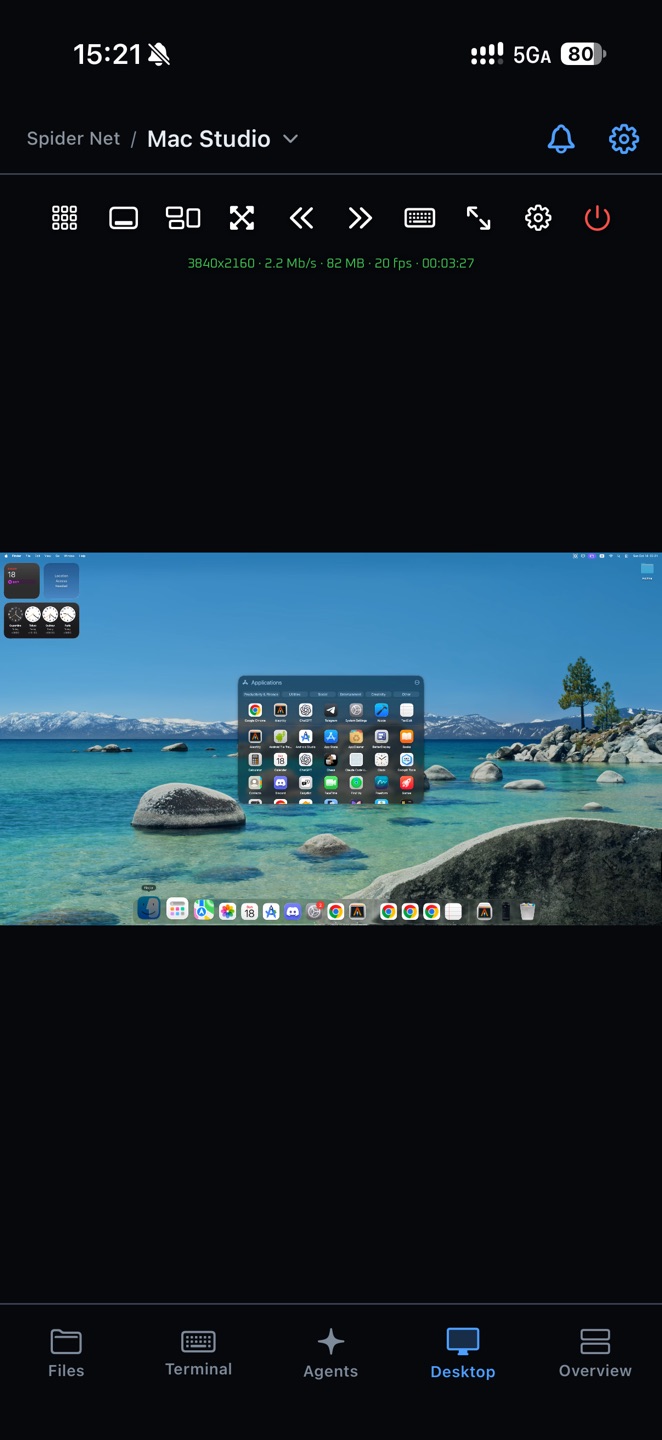
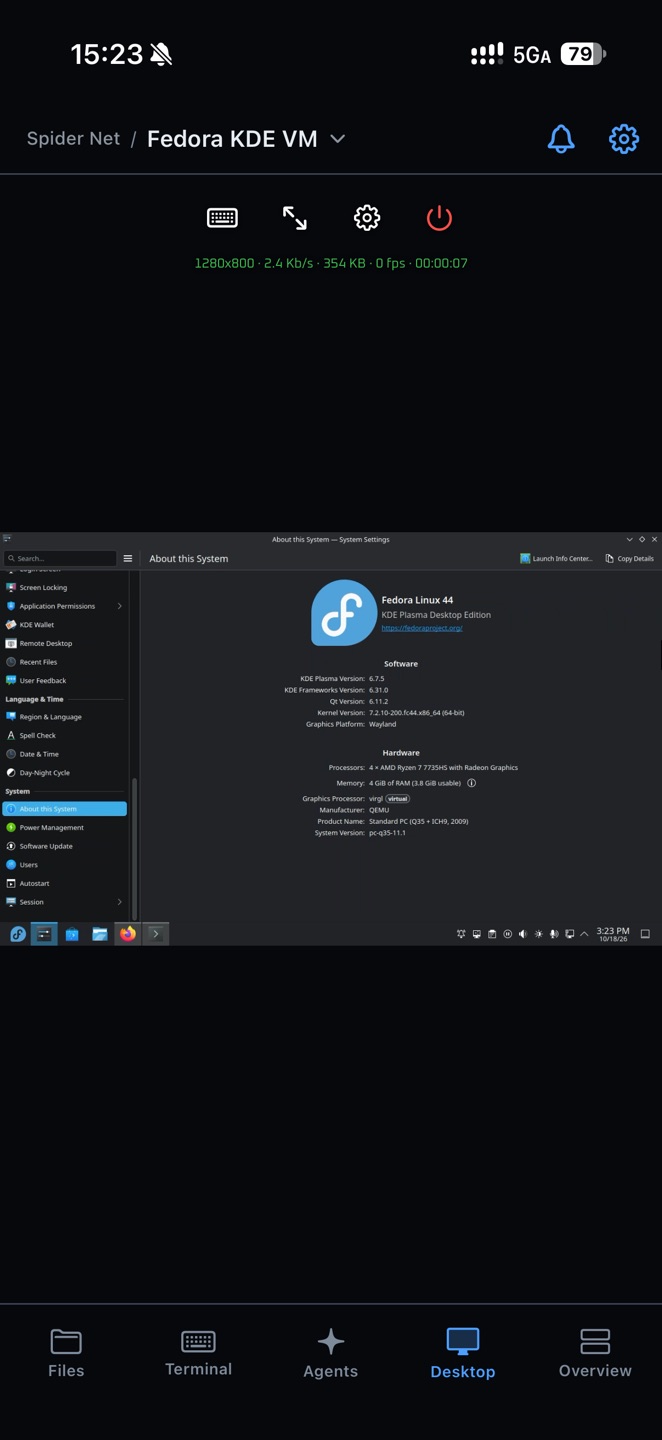
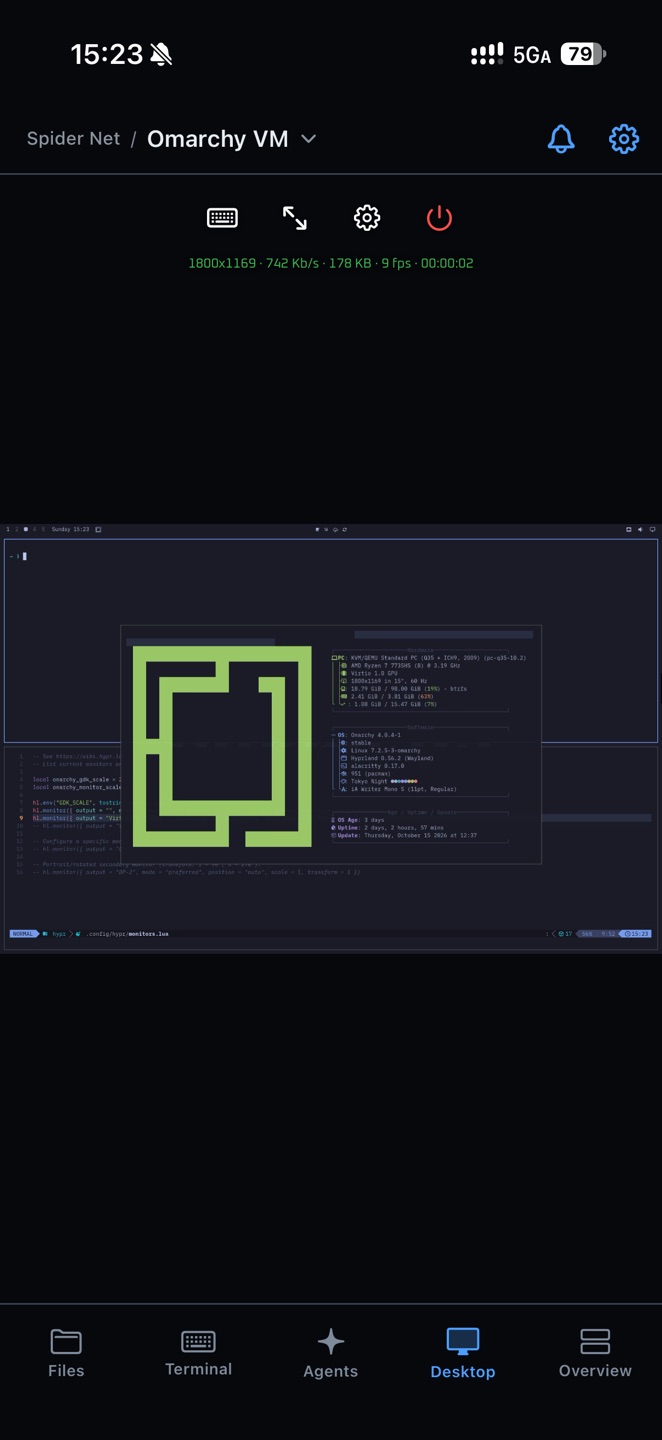
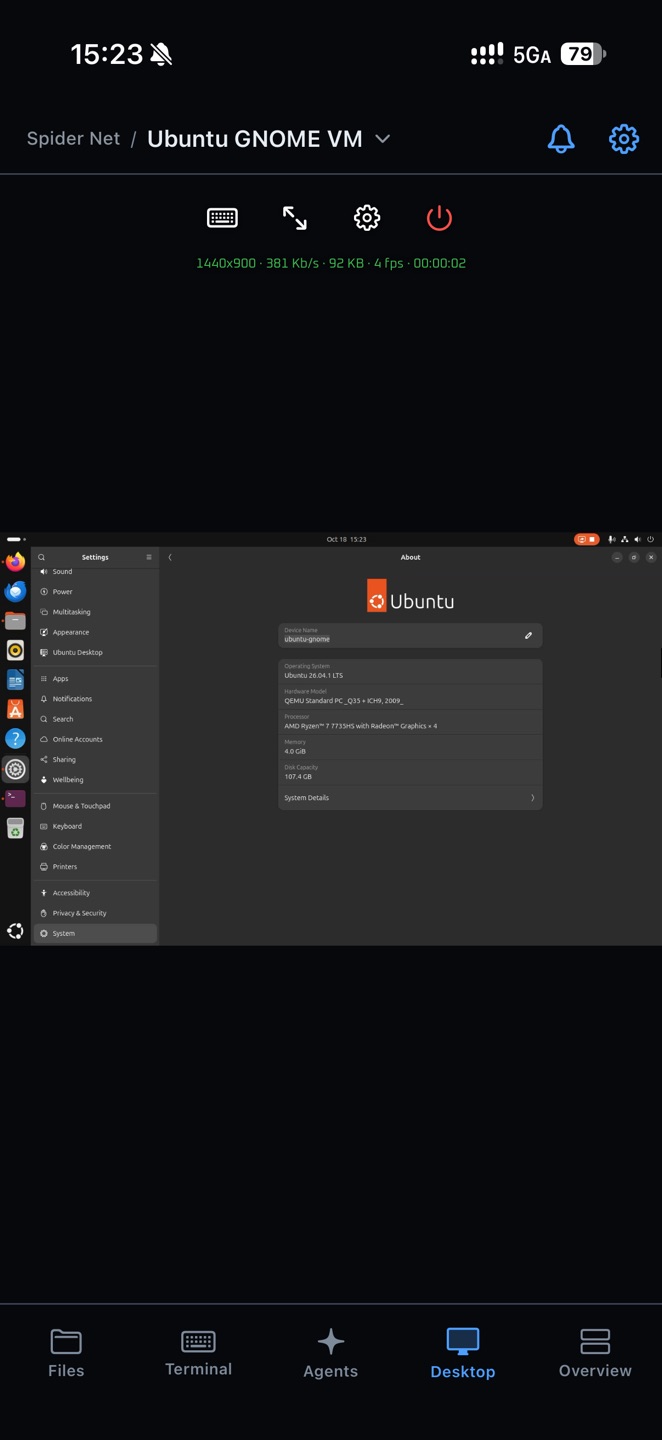
Your Mac at home. A Linux workstation across the room. See and control their screens through the same mesh, with touch controls on iPhone and a native viewer on Mac.

Actual iPhone captures · macOS, KDE Plasma, Hyprland and GNOME. Open any screenshot for the full-size view.

From your iPhone

Touch-friendly pointer, zoom and keyboard controls put the remote screen in your hands. Connect to Mac and Linux hosts.

From your Mac

Open Mac and Linux desktops in native viewer windows on your Mac, with keyboard and pointer input, audio, full screen and connection statistics.

Linux host requirements

Linux desktop hosting requires the GNU/glibc build and a logged-in graphical session. GNOME, KDE Plasma and Hyprland Wayland use PipeWire and a ScreenCast v4+ portal. X11 uses local approval and a visible Stop sharing control; system audio requires PipeWire. Run meshieve mesh start --desktop-access admin as the desktop user. Headless desktops, WSL desktop hosting and musl builds are not supported.

Get started

Start with your Mac. Take it with you.

Install the Mac app to create or join a mesh. Add your iPhone with an invite QR, or use the CLI on Linux and WSL.

  • No port forwarding

    Your machine only dials out. Nothing listens on your router.

  • No VPN

    No VPN profile on your iPhone, no network settings changed on your machine.

  • No registration

    The invite QR carries everything the phone needs. No keys or IP addresses to copy.

  • No account

    No email, no password, no sign-in. Each device is known by its own key.

macOS 14+

Meshieve for Mac

Create or join a mesh, manage your peers and share your Mac’s desktop. Signed, notarized and automatically updated.

Open the app to create a mesh, or choose “Join with link” to add this Mac to an existing one. Open a peer’s desktop in its own viewer window.

iOS 18+

Meshieve for iPhone

Coding agents, terminal, files, local web services and remote desktop. Scan an invite from your machine to join its mesh.

The App Store link will appear here when the listing is available.

Connect your iPhone to a machine

  1. 1
    Install Meshieve for iPhone

    iOS 18 or later.

  2. 2
    Install Meshieve for Mac

    Remote desktop included. macOS 14 or later, updates itself.

  3. 3
    Open Meshieve for Mac

    First launch creates your mesh and shows its invite QR.

  4. 4
    Scan it with your iPhone

    Scan the short-lived invite in Meshieve. After joining, give your own phone the Admin role so it can use services shared with admins.

These examples require a CLI build with per-service access levels. They share your home folder and local ports with admins. Approve only your own trusted devices; choose a narrower folder or specific ports if needed.

By downloading or using Meshieve, you agree to the Terms of Use and Disclaimer and the Privacy Policy.

How it works

Between your devices,
by the shortest path.

Our servers help your devices find each other. They connect directly on your LAN or across the internet, or through a relay when a network blocks direct paths.

Rendezvous helps devices connect 1 2 Relay backup path · E2E encrypted 3 iPhone Meshieve app Mac mini Mac app or CLI Omarchy Linux meshieve CLI Windows 11 (WSL) meshieve CLI
  1. 1

    Meet

    An invitation adds your device to the mesh’s signed member list. The rendezvous helps members find each other; each device checks membership before accepting a connection.

  2. 2

    Go direct

    Hole punching opens a direct QUIC path, on your LAN or across the internet, with mutual TLS pinned to each device’s key.

  3. 3

    Or relay

    Behind strict NATs, a relay forwards encrypted packets it holds no key for, and the link moves to direct as soon as it can.

Your data is readable only on your connected devices. Every mesh connection is end-to-end encrypted, and the decryption keys stay on those devices. Meshieve’s servers, rendezvous operators and relay operators cannot read your terminal traffic, files or remote desktop—even when they forward every packet.

CLI

Every machine,
one terminal away.

The meshieve binary that serves your machine also drives the mesh from any terminal on it: open shells, run commands, and move files between machines.

  • A shell on every peer

    mesh shell attaches to a persistent tmux session, or runs a single command and returns its exit status.

  • Files without a file server

    Push, pull and list files within a peer’s shared folder, subject to its read and write access levels. NFS mounting also requires --serve-nfs on the host.

  • Peers by name

    Address a machine by its name, overlay IP, or the first few characters of its ID.

  • Ready for scripts

    Remote commands keep stdout, stderr and exit codes intact, and -o json gives status in a form your tools can read.

~ · zsh
See who's online
$ meshieve mesh peers
PEER NAME OVERLAY LINK RTT
7f3a2c studio-mac 100.64.0.2 direct 3ms
c91e08 build-box 100.64.0.5 direct 11ms
4b6d1f iphone 100.64.0.9 relayed 48ms
Run a command on another machine
$ meshieve mesh shell build-box -- uptime
21:14 up 12 days, 2 users, load averages: 0.42 0.38 0.35
Move files both ways
$ meshieve mesh file push build-box ./dist releases/
$ meshieve mesh file pull studio-mac notes/todo.md .
Mount a peer's folder
$ sudo meshieve mesh file mount studio-mac / ~/mnt/studio

Self-hosting

Host the entire
infrastructure yourself.

Our servers can’t read your traffic, but they see which of your devices are online, where they connect from, and the timing and volume of traffic they forward. Host the rendezvous and relay yourself and all of that stays with you.

  • Your metadata stays in-house

    Who is online, from which address, and when stays on your server. iPhone agent notifications still use our push service.

  • Relays where you want them

    Put relays near your machines or inside your network, sized for your traffic.

  • Independent of us

    Your mesh’s connectivity doesn’t depend on our rendezvous or relays.

  • One binary, nothing on the iPhone

    Rendezvous and relay ship in the meshieve binary you already run. The invite QR tells the phone where your server is.

Self-host in four steps
1 · Server · configure ~/.meshieve/config.toml
[[rendezvous]]
name = "r1"
addr = "0.0.0.0:6800"
password = "change-me"
cert = "/etc/letsencrypt/live/rdv.example.com/fullchain.pem"
key = "/etc/letsencrypt/live/rdv.example.com/privkey.pem"
2 · Server · start the rendezvous
$ meshieve rendezvous start
3 · Your machine · create the mesh on your server
$ meshieve mesh create --mesh-name Home \
--rendezvous meshieve://rdv.example.com \
--rendezvous-password change-me \
--shell-access admin --expose-ports all@admin \
--files-access admin --files-write-access admin \
--export-root ~
$ meshieve mesh start
4 · Second terminal · scan the invite
$ meshieve mesh invite --role admin

The invite gives your iPhone the server address and an Admin role. Only grant Admin to devices you trust. Your rendezvous can also relay traffic.

Add a standalone relay

Run meshieve rendezvous relay invite on the server, then meshieve relay join --invite-url with the invitation it prints and meshieve relay start on the relay host.

FAQ

Questions, answered.

Is it really free?

Yes. Meshieve is free to use. When our hosted services experience heavy traffic, we may temporarily throttle traffic passing through them to keep the service available. Third-party coding agents, AI providers and your own hosting or network services may charge separately.

Do I need an account?

No. There is no sign-up, email or password. Each device is identified by its own key, and you add devices by scanning an invite QR code.

Does it work on cellular or public Wi-Fi?

Yes. Your iPhone reaches your machine from any network. It connects directly when it can, and through a relay when a network blocks direct paths.

What can your servers see?

The rendezvous handles device names, identifiers, network addresses, and connection metadata, and forwards traffic itself when no direct link or standalone relay is available. All mesh traffic is end-to-end encrypted, so neither the rendezvous nor a standalone relay holds the keys to read it. Agent notifications use a separate push service, which receives routing identifiers, peer names, session titles, and event details and forwards them to Apple. See our Privacy Policy for details.

How is this different from SSH over a VPN?

SSH over a VPN gives you a shell. Meshieve gives you your whole development environment, on every machine you own, in one app: coding agents, terminal, files, local web services, git and the desktop. It’s built to work from every day, not just to check in on an AI. And there’s nothing to set up: no SSH keys, no firewall rules, no VPN profile.

Which coding agents are supported?

Claude Code, Codex and Pi. Codex and Pi support shared terminal sessions; Claude Code supports live read-only following and handoff to your phone. Codex cooperation is set up when you first open a Codex session in Meshieve. Restart an already-open desktop app after setup; reopen its conversation to see turns sent from another client.

What are bots?

Reusable helpers with their own personality, coding agent, model and effort level. @mention one in an agent session and it replies beside the main agent, without adding to its context. Bots can remember their exchanges or share memory within a chat. They are chat-only by default; optional read-only project tools let them list, search and read files and inspect diffs without changing the project.

Does it work on Linux and Windows?

Terminal, coding agents, files and local web services work on Linux and Windows through WSL. Remote desktop hosting works on Mac and on Linux with GNOME, KDE Plasma and Hyprland Wayland desktops or X11 desktops such as Cinnamon, Xfce and MATE. Linux hosting requires the GNU/glibc build and an active graphical login. Wayland requires PipeWire and a ScreenCast v4+ portal; X11 requires local approval and keeps a Stop sharing control visible; system audio requires PipeWire. Headless desktops, WSL desktop hosting and musl builds are not supported. Windows desktop hosting is not supported.

What do I need on my iPhone?

iOS 18 or later.